Brand: Paycom Payroll LLC
Data filtering requires a balance of visibility and intuitive application, while not being overly distracting.
Data filtering requires a balance of visibility and intuitive application, while not being overly distracting.
Filters
Design System Pattern
UX Research & Ideation
User Interface Design
Project Summary
Paycom's filter pattern has received a fair amount of feedback throughout the years. Users often felt they were hard to see, unintuitive and disconnected from the content of the page.
Team
Kale Atterberry (Lead Design)
Paycom Core DS Team
Kale Atterberry
Logan Blackburn
Karthik Abominu
Personal Contribution
UX Research & Testing
UI Design
Prototyping
Project Brief
Paycom's current filter system lacks visibility, is unintuitive, and fails to provide an easy and natural user experience.
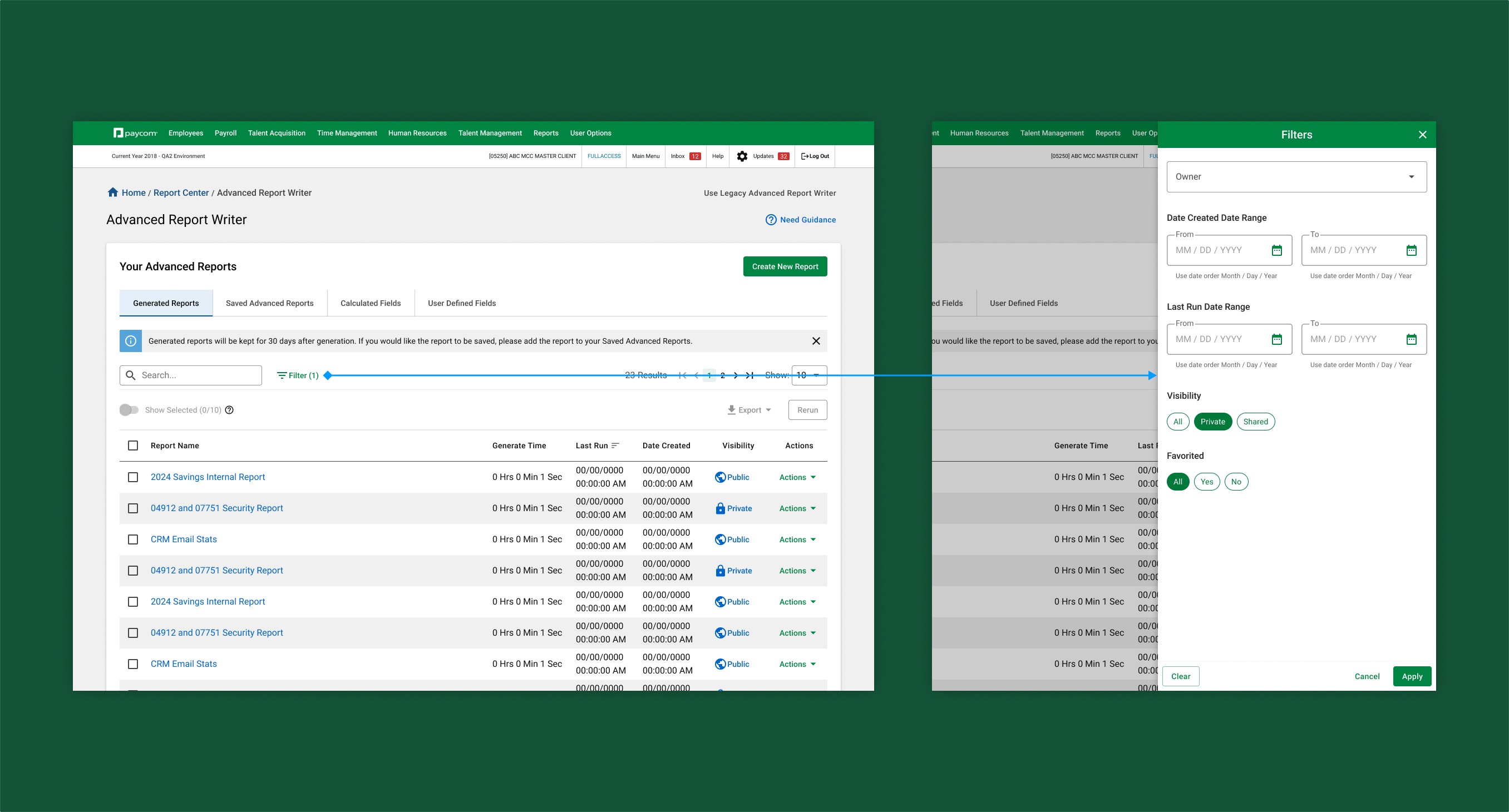
During the redesign initiative, we received a ton of user feedback on our filters, indicating issues with users understanding what filters were applied and what altering those filters was doing to the data. they also felt like the filter experience was disconnected with the side drawer pattern currently in use.
Project Brief
Paycom's current filter system lacks visibility, is unintuitive, and fails to provide an easy and natural user experience.
During the redesign initiative, we received a ton of user feedback on our filters, indicating issues with users understanding what filters were applied and what altering those filters was doing to the data. they also felt like the filter experience was disconnected with the side drawer pattern currently in use.
Research
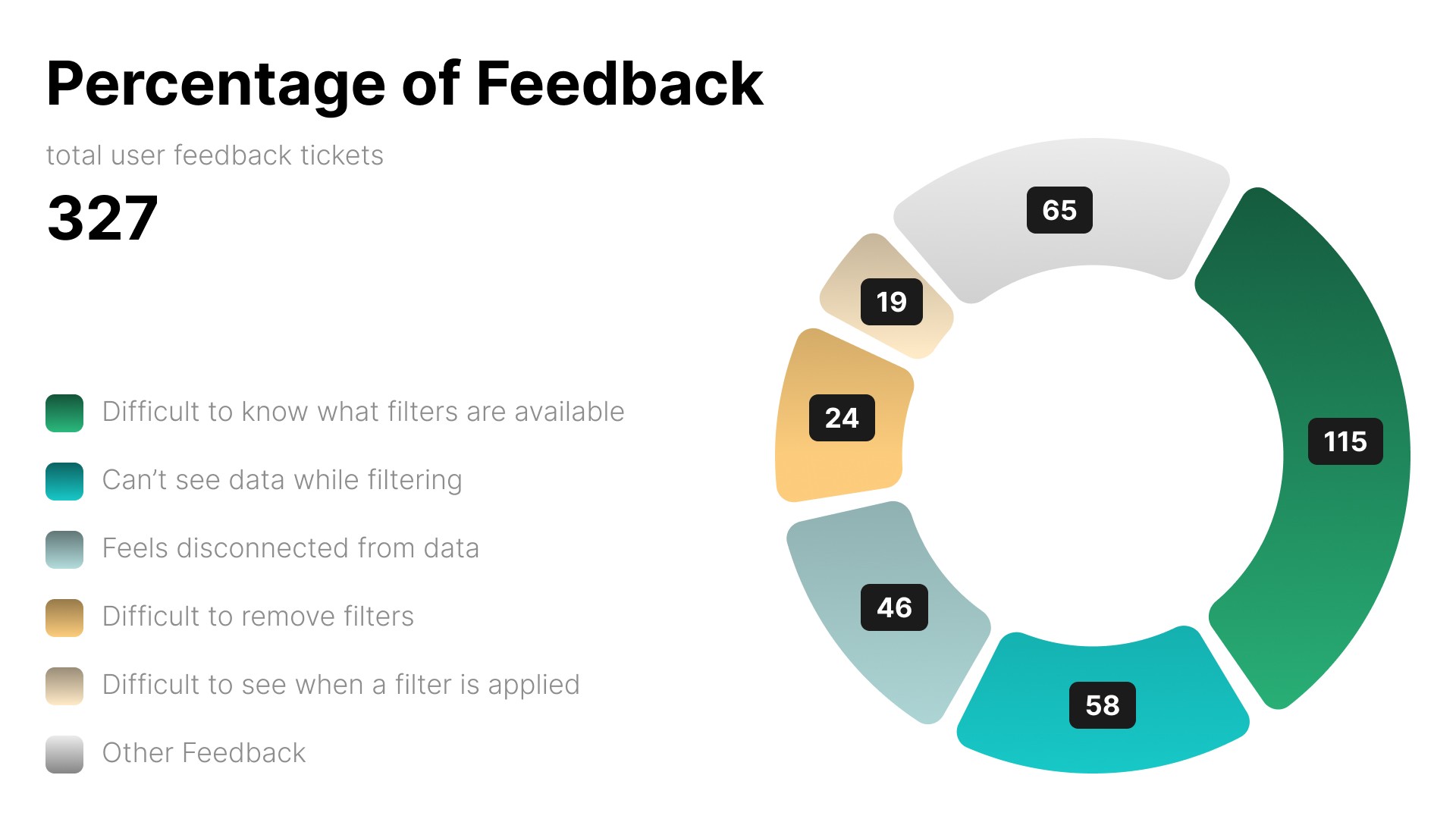
Based on the feedback received from clients over the years, we categorized and created our primary objectives.
Based on the feedback received from clients over the years, we categorized and created our primary objectives.
Visibility into applied filters and what filters were available seemed to be the biggest pain point our users were facing. Based on this, we developed 4 conceptual patterns to test which would achieve these goals at the optimal level.
Research
Based on the feedback received from clients over the years, we categorized and created our primary objectives.
Visibility into applied filters and what filters were available seemed to be the biggest pain point our users were facing. Based on this, we developed 4 conceptual patterns to test which would achieve these goals at the optimal level.
Delivered Concepts
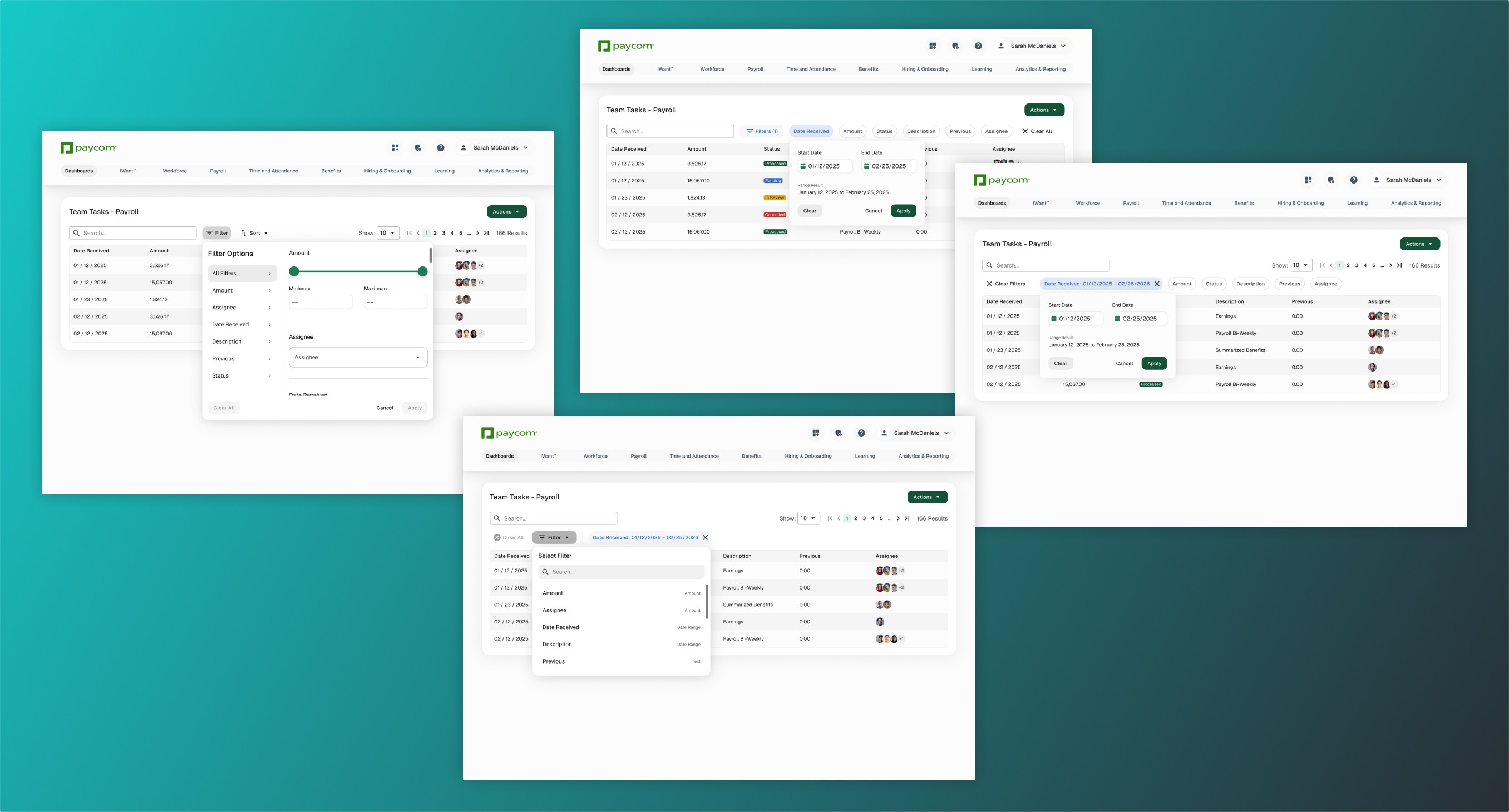
Weeks of research and conceptual exploration led to 4 refined options, each one with it's own list of strengths and weaknesses.
Weeks of research and conceptual exploration led to 4 refined options, each one with it's own list of strengths and weaknesses.
Concept 1:
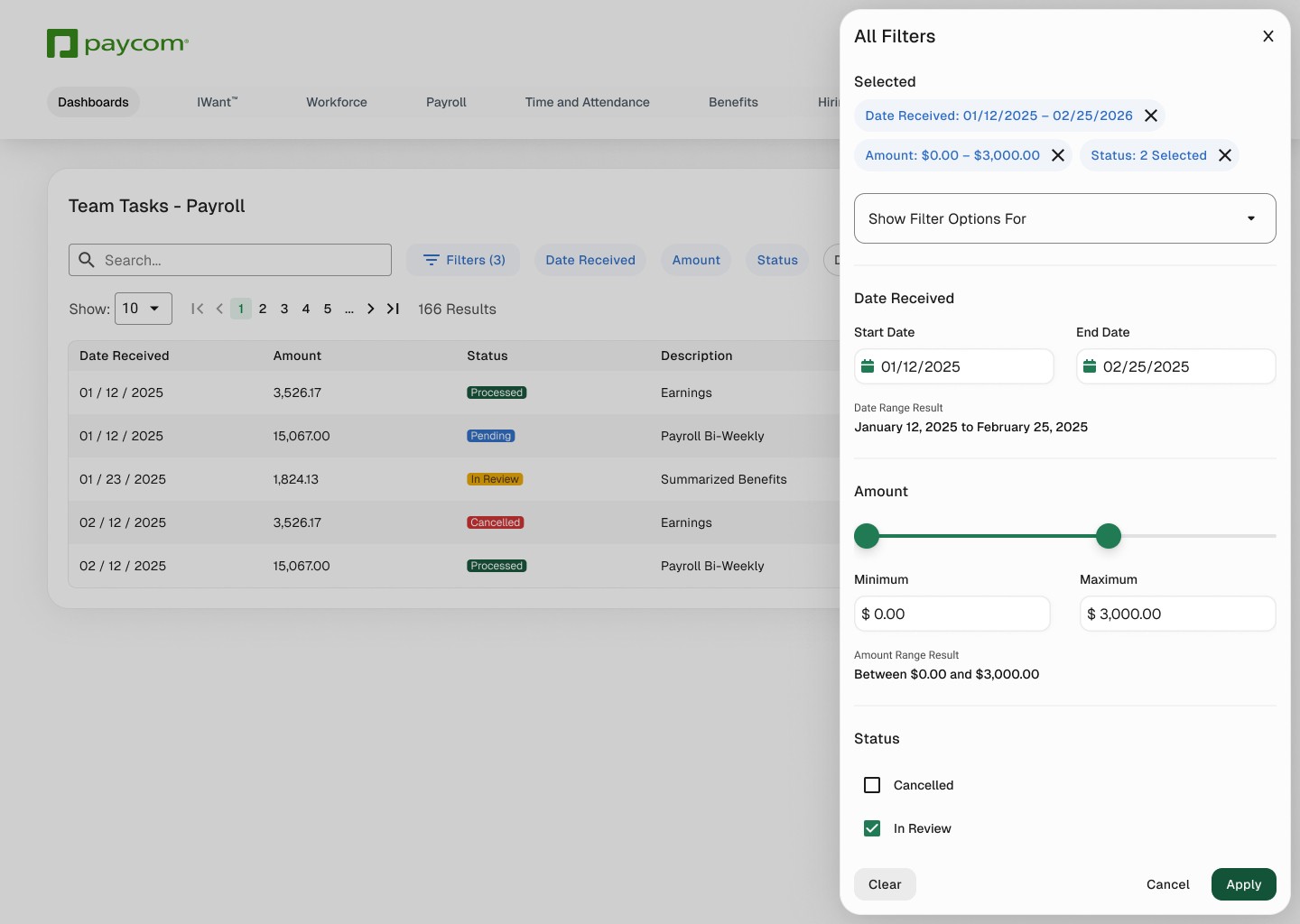
Quick filter options, with a side drawer experience for universal adoption.
Concept 1 focuses on quick actionability while not straying from the pattern our users have become familiar with. This one keeps the compact and discreet UX for filters, but doesn't solve for the visibility into what filters are available.
Concept 2:
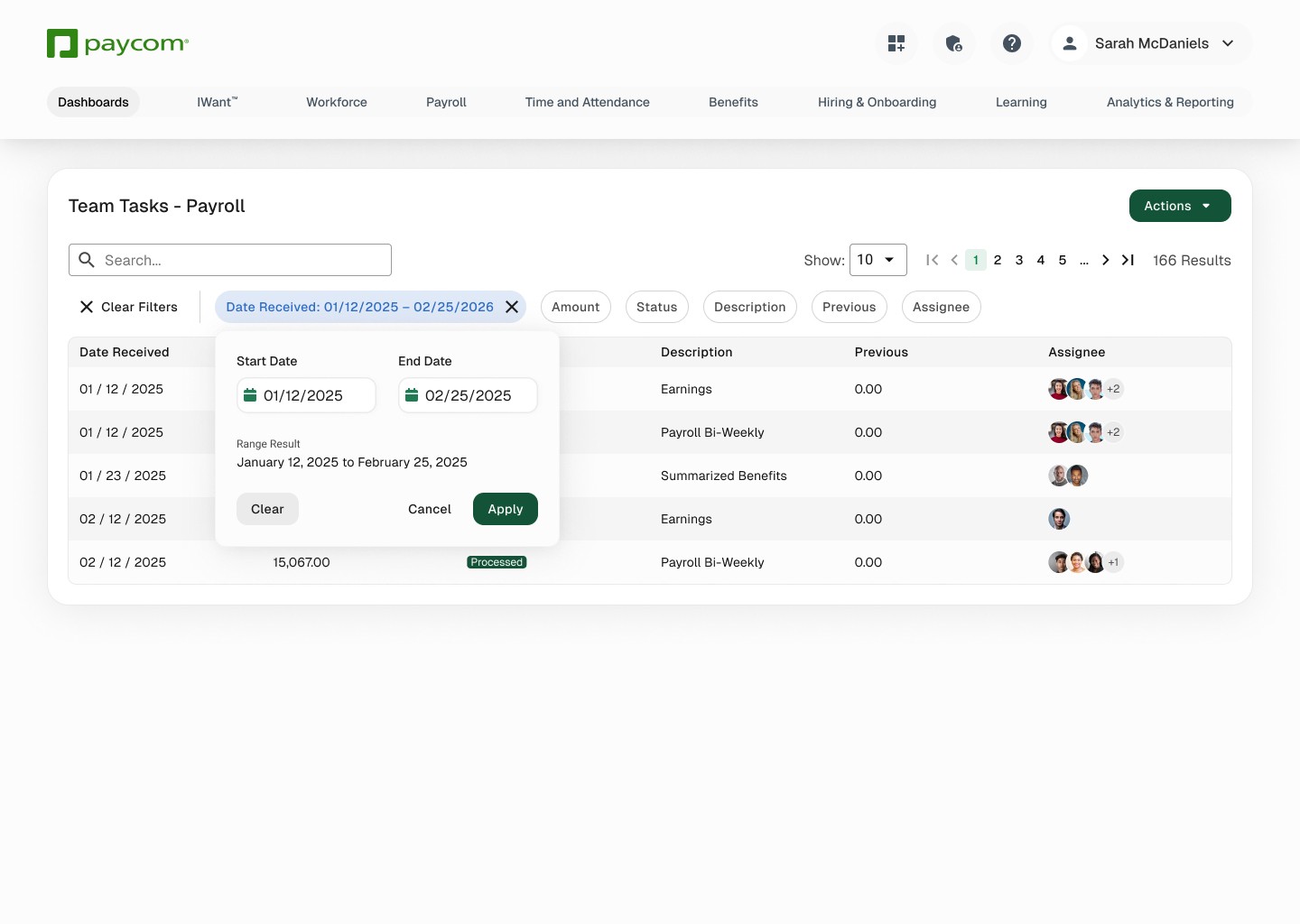
Quick filter options only, utilizing horizontal scrolling to allow for any amount of options.
Concept 2 allows for quick application and easy understanding of how to apply and remove specific filters. Unfortunately, this would force users to understand horizontal scrolling to see all available filters if the content needed many options.
Concept 3:

Progressive Disclosure utilized to have a more "in-control" approach to filtering. Allows for custom sets of filters applied with a simple walkthrough experience.
Concept 3 focuses on the user having quick access to see what filters are available, what is applied, and application customized by the user without having to leave the content.
Concept 4:

Modular popover that modernized the current pattern.
Concept 4 doesn't try to reinvent the wheel. It just simplifies the current pattern to be faster and easier to access, as well as allowing more of the space you are filtering to be visible.
Concept 1:
Quick filter options, with a side drawer experience for universal adoption.
Concept 1 focuses on quick actionability while not straying from the pattern our users have become familiar with. This one keeps the compact and discreet UX for filters, but doesn't solve for the visibility into what filters are available.
Concept 2:
Quick filter options only, utilizing horizontal scrolling to allow for any amount of options.
Concept 2 allows for quick application and easy understanding of how to apply and remove specific filters. Unfortunately, this would force users to understand horizontal scrolling to see all available filters if the content needed many options.
Concept 3:
Progressive Disclosure utilized to have a more "in-control" approach to filtering. Allows for custom sets of filters applied with a simple walkthrough experience.
Concept 3 focuses on the user having quick access to see what filters are available, what is applied, and application customized by the user without having to leave the content.
Concept 4:
Modular popover that modernized the current pattern.
Concept 4 doesn't try to reinvent the wheel. It just simplifies the current pattern to be faster and easier to access, as well as allowing more of the space you are filtering to be visible.
My Preferred
If I were given full control of delivery and function, then Option 3 would be my solution.
If I were given full control of delivery and function, then Option 3 would be my solution.
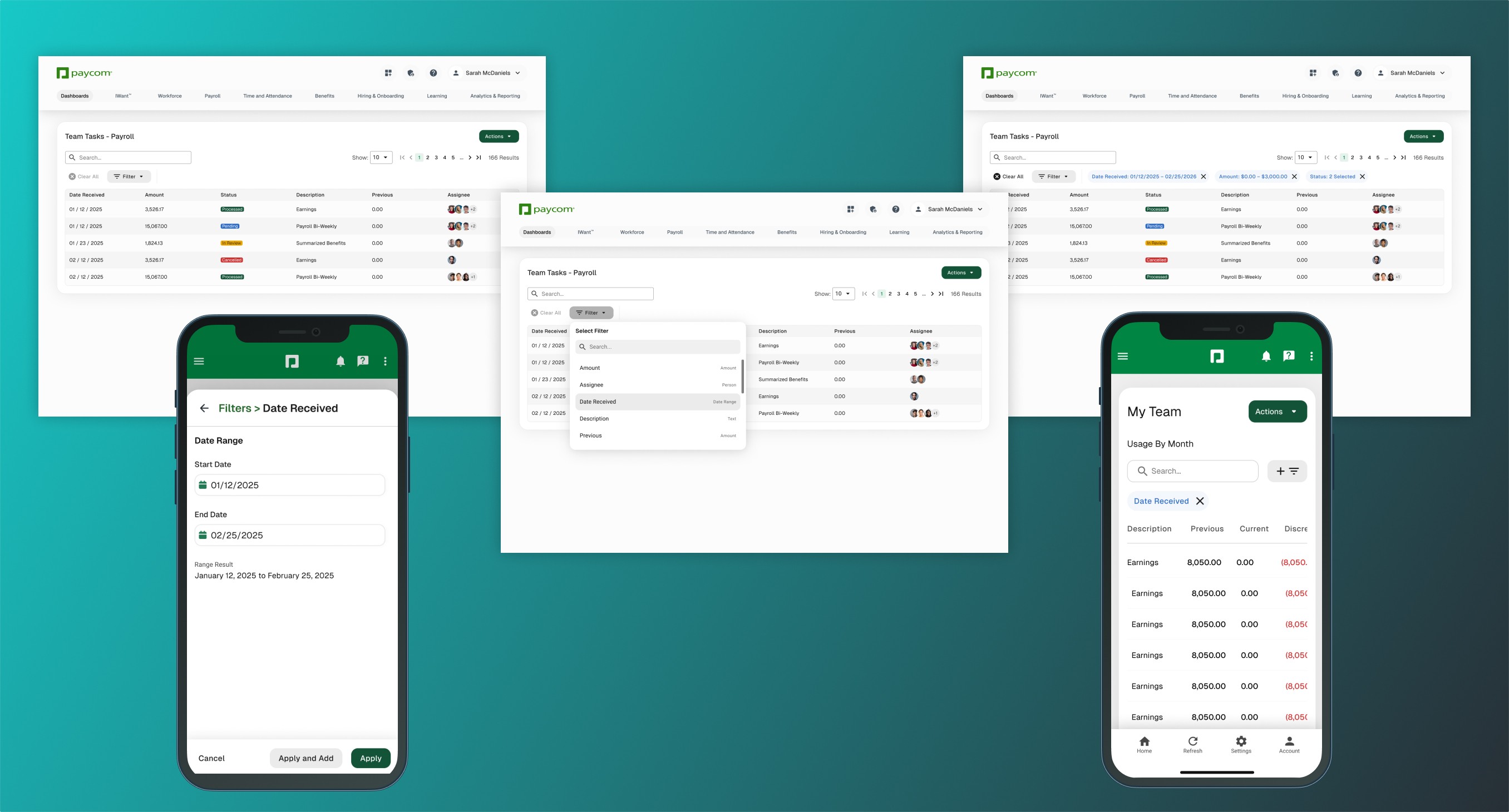
Option 3 allows for simplistic understanding and navigation across any filter set. Works well for mobile and gives decent visibility into the values that are being applied. A little more time to set up complex filtering is permissible due to usage data on 1 to 2 filters applied 86% of the time in the product.
Option 3 allows for simplistic understanding and navigation across any filter set. Works well for mobile and gives decent visibility into the values that are being applied. A little more time to set up complex filtering is permissible due to usage data on 1 to 2 filters applied 86% of the time in the product.